Dealership & Workshop
Automation
From the first enquiry to a better service experience.Connect WhatsApp enquiries, test drive requests and workshop appointments with the right team. TekkPak combines TekkChat, guided forms and scoped integrations to keep customers informed and follow up accountable.
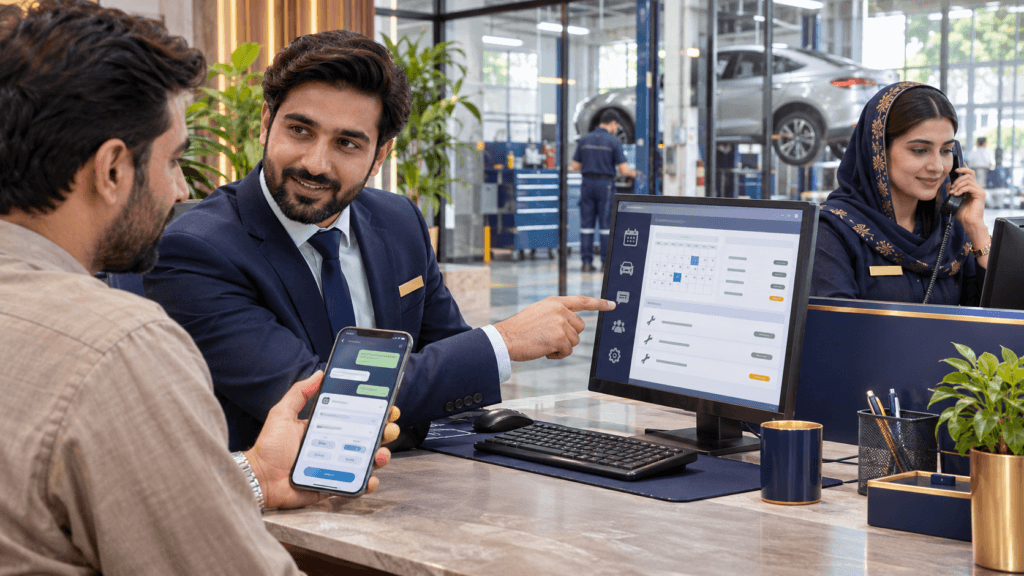
How can dealerships and service workshops automate WhatsApp enquiries?
Dealerships and workshops can connect the WhatsApp Business Platform to a shared inbox, booking calendar and supported business systems. A guided form collects the customer’s requirements, the conversation is assigned to sales or service, and the appropriate system or staff member confirms the next step. TekkChat keeps conversations, ownership and handover context together.
For a dealership, that may mean a sales enquiry becomes an assigned test drive appointment. For a workshop, it may mean a service request becomes a confirmed intake slot, an authorised estimate and a timely collection update.
What problems can dealership and workshop automation solve?
Missed sales enquiries
Capture model interest, location and preferred contact time, then give each enquiry an owner. Staff can review unanswered conversations instead of relying on one colleague’s phone.
Repeated booking calls
Collect appointment details once and let customers choose from supported availability. Give staff a clear process for confirming, changing or cancelling requests.
Customers chasing updates
Send relevant updates when an authorised job status changes. Keep the estimate, approval and next action available to the responsible team so replies remain consistent.
Measure enquiry response time, completed bookings, attended test drives, repeat status calls and unresolved cases. Better coordination can support sales and customer retention, but results depend on your staff, process and customer response.
Six practical workflows for dealerships and service workshops
1. Vehicle enquiries and sales follow up
- The customer asks about a vehicle through a connected channel.
- A short form captures model interest, budget range and branch preference.
- TekkChat assigns the conversation to a sales adviser.
- The adviser checks current information and records the agreed follow up.
Business benefit: fewer incomplete enquiries and clearer ownership. Live stock, on road prices and delivery dates require a current authorised source.
2. Test drive appointment requests
- The customer selects a model, branch and preferred date.
- The scheduler or staff checks the adviser and demonstration vehicle.
- A slot is confirmed only when the required resources are available.
- The customer receives instructions and a route to change the appointment.
Customer benefit: a clear next step. Required eligibility and document checks follow the dealership’s approved process; a preferred time alone is not a confirmed test drive.
3. Workshop service bookings
- The customer chooses a service type and shares basic vehicle details.
- The form asks for a preferred intake time and contact details.
- The workshop checks capacity, skills and expected service duration.
- The customer receives confirmation or alternative times.
Workshop benefit: better prepared arrivals. An intake appointment does not promise that a repair will finish at the same time.
4. Estimates and additional work approval
- The service adviser prepares an estimate after the appropriate assessment.
- The customer receives a secure link or the agreed approval request.
- The selected system records the estimate version, decision and time.
- Staff review the approval before proceeding under workshop rules.
Customer benefit: clearer choices and fewer misunderstandings. A chatbot must not treat silence as approval or invent repair costs.
5. Job progress and collection updates
- An authorised user changes the job status in the operating system.
- A scoped workflow checks the recipient and update.
- The customer receives the appropriate notification or adviser reply.
- Collection is confirmed after the workshop records readiness and applicable checks.
Workshop benefit: fewer repetitive status calls. Messages should reflect recorded progress, not an AI prediction of completion.
6. Service reminders and aftersales support
- An agreed service rule identifies customers due for follow up.
- The workflow checks contact permission and relevant records.
- A permitted reminder offers a booking route.
- Questions, complaints or warranty issues are assigned to staff.
Business benefit: a more organised relationship after the visit. Use maintained service records and approved intervals; avoid guessing maintenance needs from chat alone.
TekkChat for dealerships and service workshops
TekkChat is TekkPak’s omnichannel customer support solution. Supported WhatsApp, website chat, email and social messaging connections can bring enquiries into a shared inbox, with assignment, internal notes, saved replies and conversation history.
Explore the TekkChat solution
See how your team can manage conversations, assign ownership, collaborate privately and use optional automation. Configure the workspace around your dealership, branches or workshop reception.
Explore TekkChat customer support softwareA simple handover example
- Sales receives a vehicle enquiry.
- The adviser confirms the next action with the customer.
- A service question is transferred to the appropriate team.
- The next colleague sees the conversation and relevant internal notes.
Connect the business records you need
TekkChat coordinates communication. Your CRM, dealer management system or workshop software remains responsible for the relevant business records. Job cards, stock, estimates, invoices and capacity require their own configured processes or supported integrations.
Agree channel connections, staff roles, business hours and escalation rules during setup. After hours enquiry capture and acknowledgements can be scoped without promising that a person or repair technician is available around the clock.
Affordable software options TekkPak can implement and connect
A small workshop can start with clear enquiries, reception ownership and an appointment calendar. A larger dealership may also need CRM, workshop records and integrations. Every component should have a defined job.
WhatsApp Flows: structured intake
Purpose: collect the right information without a long exchange of chat questions.
- The customer opens a test drive or service request form.
- Screens collect the model, service choice and preferred time.
- The connected workflow validates the submission.
- The customer sees the next step or pending status.
A dynamic connection can check supported availability. The form itself does not know workshop capacity or guarantee a reservation.
Odoo CRM: accountable sales follow up
Purpose: keep qualified opportunities and next actions organised.
- A scoped connection creates or updates the enquiry.
- The lead reaches the agreed sales team.
- An adviser records the requirement and follow up activity.
- Managers review opportunities and overdue actions.
Useful for vehicle enquiries and corporate customers. App selection, lead rules and integrations need configuration; inventory and final offers must come from approved records.
Odoo Appointments or Microsoft Bookings
Purpose: manage suitable customer appointment slots.
- The business defines appointment types and availability.
- The customer chooses a published slot.
- The selected calendar records the booking.
- Configured email notifications confirm details and reminders.
Assess these for adviser consultations, test drive requests or workshop intake. Microsoft Bookings may be included in an eligible Microsoft 365 plan. Technician skills, vehicle availability and workshop bays need the appropriate capacity model.
Workshop records and Odoo business apps
Purpose: connect service administration with the relevant operating records.
- Staff assess the work and create the agreed job record.
- The selected system records required parts, estimate and approval.
- Staff update progress and confirm completed work.
- The invoicing and collection process follows the approved status.
TekkPak can assess suitable Odoo apps or your existing workshop system. A complete automotive job card, labour, warranty or manufacturer workflow may need additional configuration or modules. It is not included automatically.
n8n: connect systems and notifications
Purpose: reduce repeated copying between compatible tools.
- A new enquiry, booking or job event triggers the workflow.
- It checks required fields and repeated submissions.
- It creates the agreed record or notification.
- Errors go to a monitored staff queue.
Supported APIs, permissions and provider access determine what is possible. Hosting, testing and maintenance are part of the scope; a generic connector does not guarantee access to every dealer system.
Website chat, forms and optional AI
Purpose: offer enquiry routes beyond WhatsApp and assist with approved answers.
- The customer opens your site or appointment link.
- A form or chat captures the requirement.
- Approved information answers routine questions where configured.
- Uncertain, account specific or technical issues go to staff.
Website and email exchanges avoid Meta message fees for those exchanges. Optional AI requires maintained knowledge, data handling controls and usage budgeting. It should not diagnose a vehicle fault or make safety assurances.
How do you prevent unsuitable or overlapping bookings?
| Booking type | What must be checked | Customer wording |
|---|---|---|
| Test drive | Branch, demonstration vehicle, adviser and approved eligibility process | Confirmed test drive only after the required checks |
| Routine workshop intake | Service type, duration, intake limits and relevant resources | Confirmed arrival time with a separate completion estimate |
| Diagnostic assessment | Appropriate technician and assessment capacity | Assessment appointment; repair scope follows inspection |
| Additional repair work | Recorded customer approval, parts and workshop capacity | Approved work with a revised estimate where needed |
Recheck availability when saving a booking, prevent repeated submissions from creating duplicates and record telephone or walk in bookings in the same operating process. If a required connection fails, keep the request pending and notify staff.
Example: a customer asks for a brake inspection tomorrow
The form captures the vehicle and preferred intake time. The workshop checks diagnostic capacity and confirms an assessment appointment. A technician evaluates the vehicle, and the adviser explains the findings and estimate before additional work is approved. The booking assistant does not declare the vehicle safe to drive.
Which automation setup fits your business?
Independent workshop
Start with assigned service enquiries, approved replies and a clear booking process. Add job status updates when staff maintain reliable records. Keep an adviser available for estimates and technical questions.
Vehicle dealership
Separate sales enquiries, test drives and service requests. Connect qualified leads to CRM and check the resources needed for appointments. Keep offers and delivery commitments tied to current authorised information.
Several branches or teams
Route enquiries by branch and purpose, define shared ownership rules and scope integration with existing dealer or workshop systems. Agree which team handles a customer who changes branch or needs escalation.
You do not need every app to begin. Choose the most frequent missed enquiry or repeated administrative task, configure that workflow and measure its effect before adding more software.
What does dealership or workshop WhatsApp automation cost?
A useful proposal separates the initial build from recurring software, support and communication usage. Exact costs depend on channels, users, branches, appointment logic and system access.
Setup and integration
Include process mapping, channel setup, forms, approved content, data mapping, testing and staff training. Dealer or workshop providers may charge for API access or integration support.
Software and operation
Budget for TekkChat, selected Microsoft or Odoo licences, hosting, monitoring and support. Optional AI, SMS, payment services and other usage based components need separate estimates.
WhatsApp message charges
Meta’s current pricing FAQ states that each business phone number has 1,000 free service messages per month, with charging from message 1,001 effective 1 October 2026. Templates and other categories follow their applicable pricing rules. This is a message allowance, not 1,000 free bookings.
Flows can collect several answers through form screens and reduce separate chat questions. Count the invitation, confirmation, reminders and staff replies in your estimate. Website booking and email may be useful alternatives for some exchanges. Read Meta’s current pricing FAQ.
Plan approvals, privacy and human assistance
Use current approved information
Maintain opening hours, model details, published offers and service information. Check stock, parts, prices and job progress against the agreed source. Mark estimates and pending requests clearly.
Respect customer permissions
Use the required WhatsApp permissions, honour opt outs and apply the appropriate approved templates outside the 24 hour customer service window. Keep service updates separate from promotional offers.
Protect records and escalate
Verify the customer before exposing job or vehicle records. Use approved secure routes for payments and identity documents. Give staff responsibility for disputes, warranty decisions, safety concerns and advice that requires a qualified technician.
Follow the WhatsApp Business Messaging Policy. Agree retention, user permissions and access to connected systems before launch. A chat assistant should always provide an appropriate route to a person.
How TekkPak delivers your dealership or workshop workflow
Map one customer journey
Select sales enquiries, test drives or service intake as the first workflow. Agree branches, users, service types, required information and which steps need staff approval.
Configure and test
Review supported system access, configure the inbox and calendar, then test busy slots, repeated requests, missing details, cancellations and failed connections. Confirm exactly what each customer notification means.
Train and improve
Show staff how to assign conversations, change bookings and update records. Review response time, booking attendance, status enquiries and unresolved cases against the starting baseline.
For a proposal, share: your number of branches and users, approximate enquiries and bookings per month, current CRM or dealer management software, workshop system, preferred languages and the first two processes to improve. No customer records are needed for the initial discussion.
TekkPak Technologies scopes local and remote delivery from Lahore, Pakistan, for dealerships and workshops in Pakistan and international markets, subject to product availability, access and the agreed support scope.
Answers for dealerships, service advisers and workshop owners
How can I automate my workshop’s WhatsApp bookings?
Connect WhatsApp to an assigned reception inbox and a suitable scheduling process. Use a Flow or booking link to collect details, check workshop capacity and confirm an intake appointment. Keep exceptions and technical questions with staff.
Can customers book a test drive through WhatsApp?
A Flow can collect the model, branch and preferred time. A connected scheduler or authorised adviser must check the demonstration vehicle, staff and relevant requirements before confirming the test drive.
Does TekkChat replace dealer management or workshop software?
TekkChat manages customer conversations and collaboration. Stock, vehicle records, job cards, estimates and invoicing remain in the selected operating systems. Connections are assessed and included only within an agreed scope.
Can we connect our existing CRM or dealer management system?
TekkPak reviews the provider’s supported APIs, permissions and commercial access first. Available features differ by system. Where direct integration is unavailable, an assigned staff process or booking link may be the appropriate start.
Can the system share repair progress automatically?
Yes, when a scoped integration receives reliable, authorised job status changes. Without a live connection, staff should verify the current position before replying. Automation should not invent progress or completion times.
Can customers approve an estimate digitally?
An agreed workflow can request and record a decision against the relevant estimate. Confirm the system, identity checks and approval process before deployment. Staff should verify the decision before starting additional work.
Can Microsoft Bookings or Odoo Appointments schedule workshop visits?
They can support suitable appointment types after configuration. Assess how service duration, intake limits and resources will be handled. An appointment calendar alone does not manage every workshop bay, technician skill or parts constraint.
Is WhatsApp automation free for a small workshop?
The full solution can include setup, software, hosting, support and message usage costs. The service message allowance is not unlimited free customer conversations. TekkPak can estimate the cost around your expected activity.
Can we use website forms and email instead?
Yes. A website enquiry form, appointment page, chat and email notifications can support customers beyond WhatsApp. Choose the channels that suit your customers and staff, and include the selected software and hosting costs.
Can an automotive chatbot diagnose faults or tell someone a vehicle is safe?
Its role here is administrative assistance and approved business information. Diagnosis and safety advice require the appropriate qualified professional. Route those questions to the workshop rather than generating an assurance.
Can we send automatic service reminders?
A scoped workflow can use maintained service records and approved reminder rules. Check customer permission, message category and timing. Promotional offers need the appropriate permission and messaging treatment.
What information does TekkPak need for a demonstration?
Share branch and user counts, current systems, approximate enquiry volume, languages and the workflows you want to improve. TekkPak can demonstrate the proposed journey and explain setup, integration and recurring costs.
Sources behind this practical guide
- Meta: WhatsApp Flows and connected form workflows.
- Meta: current Business Platform pricing FAQ. This article follows the current pricing section.
- Meta: Business Messaging Policy.
- Odoo: Appointments features.
- Microsoft: Bookings overview and availability.
Review current product access, licences and messaging rules when scoping a deployment. The workflows above describe implementation options; they are not a claim of a completed customer deployment.
Plan your dealership or workshop automation with TekkPak
Start with a focused workflow, a clear staff handover and the systems you already use. Ask for a demonstration and an itemised implementation scope.
Official WhatsApp
Request a demonstration around sales enquiries or workshop bookings.
Message TekkPakCall our office
Discuss branches, users and connections to your existing systems.
+92 42 32461500Email your brief
Share the processes and software your team currently uses.
Email RequirementsCustomer portal
Existing customers can access their account and service records.
Open Customer PortalDiscover more from TekkPak Technologies
Subscribe to get the latest posts sent to your email.