Pakistan buyer's guide · Reviewed September 2026
Grandstream GRP vs GXP IP Phones: Which Series Should You Choose?
A practical, model-aware comparison of Grandstream desk phones for new rollouts, existing fleets, reception consoles, executives, call centres and multi-PBX environments.
- Model-specific facts
- Pakistan buying advice
- 3CX and UCM context
The short answer
Choose the deployment strategy first, then the phone model
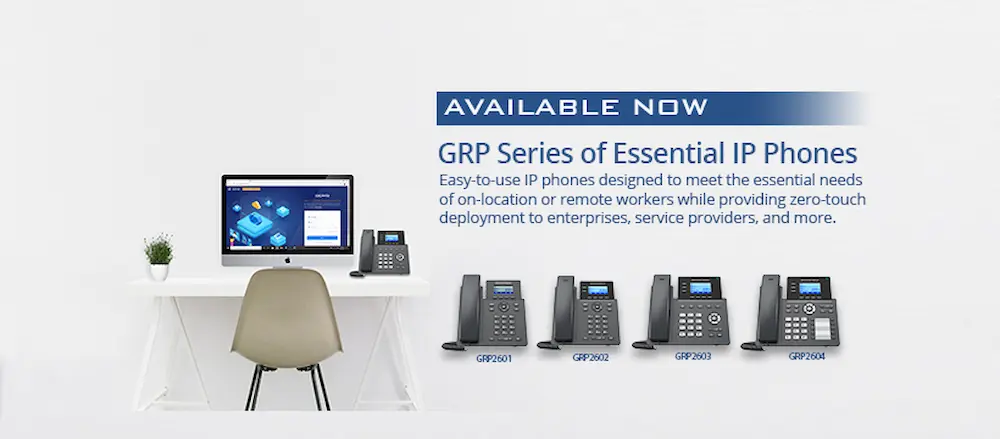
For most new Grandstream UCM or validated open-SIP deployments in Pakistan, begin with the GRP series. It was designed for mass deployment and works with Grandstream Device Management System, or GDMS. For a healthy existing GXP estate, keeping compatible models can still be commercially sensible when firmware, PBX support, spares and lifecycle are verified.
Neither label guarantees that every model has Wi-Fi, Bluetooth, Gigabit Ethernet, PoE or the same number of SIP accounts. Compare the exact model and revision.
Interactive recommendation
Find the right Grandstream phone path
Choose your situation and role. The result is a shortlist for discussion, not a substitute for checking PBX support, firmware and local stock.
Suggested starting point
GRP2602P or GRP2604P
For a new standard-desk rollout, these GRP Essential models provide central GDMS management and practical SIP capacity without paying for an executive display or a large BLF panel.
Using 3CX? Check its current fully supported list before purchasing. GRP26 and GXP are presently listed as supported with limitations.
Request a model and quantity reviewFamily comparison
GRP vs GXP at a glance
These are family-level tendencies. Exact specifications and lifecycle status belong to the individual model.
| Decision factor | GRP series | GXP series |
|---|---|---|
| Best starting point for | New and standardised deployments | Existing estates and verified replacement needs |
| Product positioning | Carrier-grade phones designed for mass deployment | Mature business SIP phone families across basic to high-end roles |
| Fleet management | GDMS is a core deployment advantage | Provisioning options vary by model and PBX workflow |
| Security design | Newer GRP platform with security-oriented deployment features | Depends on exact model, firmware and lifecycle |
| Wi-Fi and Bluetooth | Built in on selected models only | Also available on selected models, not the whole family |
| Ethernet and PoE | Fast or Gigabit Ethernet by model; PoE suffix and specification matter | Fast or Gigabit Ethernet by model; PoE support varies |
| Operator expansion | Selected models work with GBX20 | Selected models work with GXP2200EXT |
| Lifecycle check | Verify current catalogue and firmware | Especially important because some models are archived or end of life |
| 3CX deployment | Check the current GRP26 support page and its limitations | Check the current GXP guide, supported list and firmware requirements |
Why GRP leads for new fleets
Designed to reduce deployment and support overhead
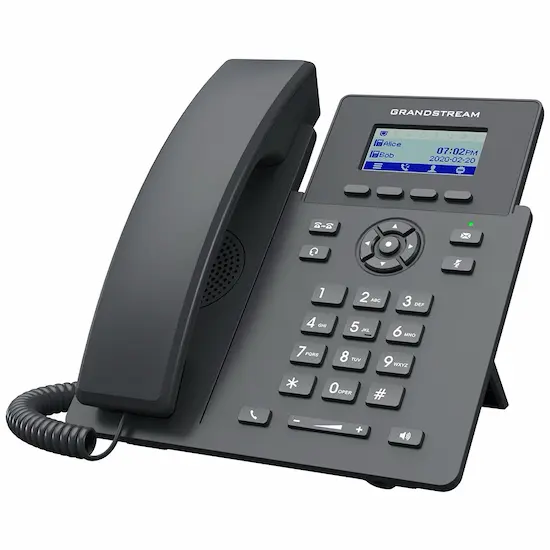
GRP phones are positioned around mass deployment, consistent administration and modern fleet operations. That matters when a Pakistani business is opening branches, standardising hundreds of desks or supporting phones remotely.
- GDMS management: central inventory, configuration and device administration.
- Role coverage: entry models, professional desk phones and higher-capacity executive choices.
- Model-aware wireless: Wi-Fi and Bluetooth on selected professional models.
- Expansion options: compatible models can add GBX20 extension modules for dense BLF monitoring.
Where GXP still fits
A mature installed base can be an asset
“Older family” does not automatically mean “replace every phone.” A measured decision can preserve investment without creating support risk.
Maintain a known estate
If a GXP fleet is reliable, correctly provisioned and supported by the PBX, targeted replacement may be more sensible than an immediate full refresh.
Match existing workflows
Receptionists and power users may already rely on particular line-key layouts, BLF mappings and extension modules. Migration should account for training and templates.
Verify before buying
Check the exact model on Grandstream's current catalogue or product archive, then confirm firmware, PBX support, warranty, accessories and genuine local availability.
Representative models
Compare specifications that affect real deployments
“Lines,” “SIP accounts” and “BLF keys” are not interchangeable. A line key is a call appearance or programmable key, a SIP account is a registered identity, and BLF keys monitor extensions or invoke features.
| Model | Published capacity | Useful distinction | Typical role |
|---|---|---|---|
| GRP2602P | 2 lines, 4 SIP accounts | PoE, HD audio, GDMS | Entry and standard desks |
| GRP2604P | 3 lines, 6 SIP accounts | Gigabit, PoE, EHS support | Busy standard users |
| GRP2614 | 4 line keys, up to 12 SIP accounts | Wi-Fi, Bluetooth, Gigabit and PoE | Managers and executives |
| GRP2615 | 10 line keys, up to 16 SIP accounts | 40 digital BLF keys; GBX20 compatible | Reception and high-volume users |
| GRP2670 | 12 lines, up to 16 SIP accounts in current documentation | 7-inch touchscreen, 48 virtual keys; GBX20 compatible | Executive and operator roles |
| Model | Published capacity | Useful distinction | Typical role |
|---|---|---|---|
| GXP1625 | 2 lines, 2 SIP accounts | Fast Ethernet and PoE | Existing basic desk estate |
| GXP1628 | 2 lines, 2 SIP accounts | Gigabit and PoE | Existing standard desk estate |
| GXP2130 v2 | 3 lines, 3 SIP accounts | Gigabit, PoE and Bluetooth | Existing professional estate |
| GXP2160 | 6 lines, 6 SIP accounts | 24 BLF keys, Gigabit, PoE and Bluetooth | Existing busy-user estate |
| GXP2170 | 12 line keys, 6 SIP accounts | 48 digital BLF keys; GXP2200EXT compatible | Existing executive or reception estate |
Specifications are condensed from Grandstream's published product pages and manuals. Always confirm the exact hardware revision, current datasheet, firmware and local package before procurement.
Reception and operator console
Choose capacity, visibility and workflow together
An operator phone needs more than a large account count. Focus on visible BLF keys, expansion capacity, transfer workflow, headset support and the receptionist's daily call volume.
New deployment
GRP2615 or GRP2670 + GBX20
Shortlist the GRP2615 when physical line keys and a conventional operator layout suit the desk. Consider the GRP2670 when a larger touchscreen and virtual-key workflow are preferred.
- GBX20 supports up to 40 contacts per module
- Up to four modules can provide 160 additional contacts
- Confirm compatible model, power and firmware requirements
Existing GXP deployment
GXP2170 + GXP2200EXT
This can remain a practical reception setup in a supported existing estate. Treat it as an installed-base decision and verify phone lifecycle, PBX support and expansion-module availability before buying more units.
- GXP2170 has 48 digital BLF keys
- GXP2200EXT is the matching expansion family
- Do not confuse 12 line keys with 12 SIP accounts
Use-case guide
Sometimes the best answer is neither GRP nor GXP
Grandstream has purpose-built families for video, cordless mobility and hospitality. Forcing every user into a desk-phone comparison creates poor recommendations.
GRP2602P or GRP2604P
Good starting points for new offices. Choose capacity, Gigabit networking and EHS needs by model.
GRP2614, GRP2615 or GRP2670
Compare display, programmable keys, wireless features and touchscreen preference.
Simple GRP + quality headset
Prioritise headset compatibility, PoE, comfort and reliable provisioning over an oversized display.
Compare SIP account capacity
Multiple registrations may work, but each PBX's authentication, dial plan, codecs, TLS and provisioning must be validated.
Consider the GXV series
GRP and GXP are primarily audio desk phones. A GXV video phone or 3CX app may be the more appropriate route.
Consider WP, DP or a softphone
For warehouses, campuses and roaming staff, Wi-Fi handsets, DECT or a mobile app can fit better than a fixed desk phone.
Consider the GHP series
Hospitality phones are purpose-built for guestrooms, wall mounting and simplified controls.
Add the right gateway
FXS and FXO gateways bridge analogue endpoints or PSTN lines to the IP PBX. They are not a substitute for checking SIP phone compatibility.
3CX, UCM and open SIP
“SIP compatible” is not the same as fully supported
A phone may register and make calls while lacking a current provisioning template, supported firmware, secure remote provisioning or full feature parity. 3CX currently documents GRP26 and GXP deployments separately and notes model-specific limitations.
Important for new purchases: 3CX's supported-phone page, updated 28 June 2026, places both families in its “Supported (with limitations)” category and says phones in that category should not be bought new or second hand. That warning applies specifically to a 3CX buying decision, even though the same GRP model may be appropriate with a Grandstream UCM or another validated SIP platform.
For Grandstream UCM deployments, validate zero-touch or GDMS workflows, firmware, button templates and remote-extension design. For any other SIP PBX, test registration, transfer, BLF, voicemail, TLS/SRTP and failover before bulk purchasing.
Local procurement
Pakistan IP phone buying checklist
Price is only one part of the installed cost. Use this checklist before approving a quotation or importing a large batch.
- 01
Confirm genuine channel stock
Ask for the exact model, hardware revision, warranty route, serial traceability and whether accessories are included.
- 02
Check lifecycle and firmware
Verify whether the model is current, archived or end of life and whether your PBX requires a particular firmware release.
- 03
Design PoE capacity
Calculate switch PoE budget, port count, UPS runtime and power-adapter needs. Do not assume every suffix includes PoE.
- 04
Validate the network
Review VLANs, DHCP options, DNS, QoS, firewall policy, remote access and internet failover before blaming the handset for call quality.
- 05
Run a proof of concept
Test representative phones with the actual PBX, SIP provider, headset, BLF layout and branch network before scaling.
- 06
Budget deployment and support
Include provisioning templates, security hardening, user training, spares and ongoing firmware governance.

Local design and supply
Buy the phone as part of a working communications system
TekkPak Technologies supplies Grandstream business communications equipment and helps organisations in Lahore and across Pakistan select, provision and integrate IP phones with suitable PBX and network infrastructure.
Frequently asked questions
GRP vs GXP questions from Pakistan buyers
Which is better, Grandstream GRP or GXP?
GRP is generally the better starting point for a new, centrally managed fleet because it is designed around mass deployment and GDMS. GXP can remain sensible for a supported existing estate. The final choice depends on the exact model, role, PBX, lifecycle and total installed cost.
Is the complete GXP series discontinued?
Do not treat the whole family as one lifecycle status. Grandstream archives individual products, and status can differ by model or revision. Check the exact device against the current catalogue, product archive, firmware page and your PBX's supported-phone list.
Are GRP and GXP phones compatible with 3CX?
3CX provides current guidance for both families, but support level, provisioning method, firmware and limitations vary. Check the exact model in 3CX's current supported-phones documentation before procurement, especially for remote or hosted deployments.
Can GRP and GXP phones be used together?
Yes, a SIP PBX can often serve both families. Each model still needs a suitable provisioning template, supported firmware, button configuration and security policy. Mixed fleets may increase administration and spare-stock complexity.
Which Grandstream phone is suitable for an operator console?
For a new fleet, shortlist the GRP2615 or GRP2670 with compatible GBX20 modules. In an existing GXP estate, the GXP2170 with GXP2200EXT may remain practical when lifecycle, firmware and PBX support are confirmed.
Can one phone connect to multiple PBX systems?
A multi-account phone may register separate SIP accounts to more than one compatible service, but account capacity alone does not guarantee a reliable design. Authentication, routing, emergency calling, BLF, TLS certificates, provisioning ownership and failover must all be tested.
Which family should I use for video calls?
For desk-based video, examine Grandstream's GXV video-phone family or a supported 3CX desktop or mobile app. GRP and GXP desk phones are primarily audio endpoints, even when they can participate in PBX workflows that also include video users.
Where can I buy Grandstream IP phones in Pakistan?
Contact TekkPak Technologies for model selection, genuine-product guidance, PBX integration and delivery options in Lahore and across Pakistan. You can also browse TekkPak's online shop or start a WhatsApp conversation.
Technical sources and review basis
This guide uses current manufacturer and PBX documentation. Recheck these pages before a large procurement because firmware, model lifecycle and PBX support can change.
Need a defensible shortlist?
Send us your users, PBX and site count
We can map standard desks, executives, reception, contact-centre agents and mobile users to an appropriate Grandstream solution for Pakistan.
Discover more from TekkPak Technologies
Subscribe to get the latest posts sent to your email.