
How to Provision Grandstream WP820 on 3CX — The Definitive Step-by-Step Guide
Unlock full wireless enterprise telephony by correctly provisioning the Grandstream WP820 Wi-Fi phone on your 3CX IP PBX system — with expert guidance from TekkPak Technologies, Pakistan's most trusted Grandstream & 3CX partner.
Published by TekkPak Technologies — ICT Solutions Experts
Grandstream Authorised Partner · 3CX Certified Partner · Lahore, Pakistan
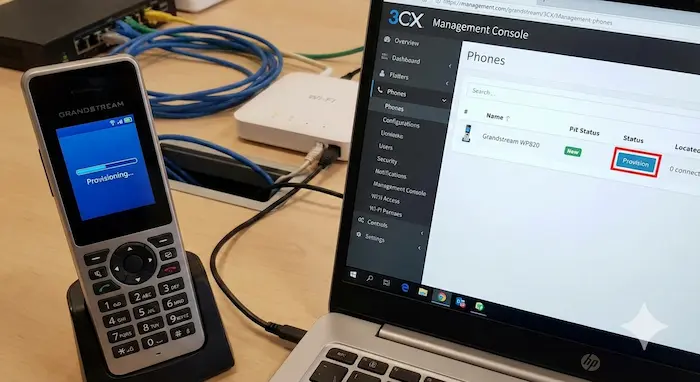
How to Provision Grandstream WP820 on 3CX: What You Need to Know First
If you are searching for a complete guide on how to provision Grandstream WP820 on 3CX, you have arrived at the right place. The Grandstream WP820 is one of the most powerful enterprise-grade portable Wi-Fi phones on the market today — featuring dual-band 802.11a/b/g/n Wi-Fi, Wi-Fi roaming, integrated Bluetooth, and a rich set of SIP telephony features. Pairing it with a 3CX IP PBX system delivers a truly mobile, cable-free enterprise communication experience.
At TekkPak Technologies, we have provisioned hundreds of Grandstream devices on 3CX across Pakistan for enterprises in healthcare, retail, education, hospitality, and warehousing. In this guide, we break down every step — from pre-requisites to full auto-provisioning — so you can get your WP820 registered and calling within minutes.
Dual-Band Wi-Fi
Supports both 2.4 GHz & 5 GHz bands with seamless roaming — no dropped calls as you move.
3CX PnP Compatible
Grandstream PnP Plug-and-Play auto-discovery works natively with 3CX Phone System on the same LAN.
HD Voice & Bluetooth
Wide-band HD audio plus integrated Bluetooth for headset connectivity and stellar call quality.
Secure Provisioning
Supports HTTPS, TLS encrypted config file download and TR-069 remote management for enterprise-grade security.
3CX Phonebook Sync
Automatically downloads your 3CX company phonebook to the handset on every boot — dial any extension effortlessly.
Zero-Touch Deploy
With PnP or GDMS cloud provisioning, deploy the WP820 with virtually zero on-device configuration.
Pre-Requisites Before You Provision Grandstream WP820 on 3CX
A smooth provisioning process depends on having all the foundational elements ready. Check these items before you begin:
| Requirement | Details |
|---|---|
| ✅ 3CX Phone System | Version 16, 18, or 20 (self-hosted or cloud). Extension must be pre-created. |
| ✅ Grandstream WP820 | Fully charged, battery inserted, powered on. |
| ✅ Wi-Fi Network | 2.4 GHz or 5 GHz access point on the same LAN as 3CX (required for PnP). |
| ✅ 3CX Extension Credentials | Extension number, SIP Auth ID & Password (from 3CX Console → Extensions → Phone Provisioning). |
| ✅ Static IP or FQDN for 3CX | Required for remote/STUN. Ports 5060 (SIP) & 9000–9500 (RTP) must be open. |
| ✅ WP820 Admin Password | Default is admin — change immediately after first login. |
How to Provision Grandstream WP820 on 3CX — Method 1: Plug-and-Play (PnP) Auto-Provisioning
PnP is the fastest and most recommended method when the WP820 is on the same LAN as your 3CX server. The phone broadcasts a SIP SUBSCRIBE to multicast 224.0.1.75, allowing 3CX to discover it automatically.
Connect WP820 to Wi-Fi
Power on → Press Menu → Settings → Wi-Fi Settings → Select SSID, enter password, connect. Ensure the phone gets an IP on the same subnet as 3CX.
Log into 3CX Management Console
Navigate to your 3CX Console URL (e.g.
https://your-3cx-fqdn:5001). Go to Phones in the left panel.Discover the WP820
Within 1–2 minutes of boot, the WP820 appears in Phones → Unassigned Devices with its Model, MAC, and IP. If not, reboot the phone on the same LAN.
Assign Extension
Click the discovered WP820 → Click Add Ext or Assign Ext. Fill in user details and click OK.
Phone Provisions Automatically
3CX pushes the config to the phone. The WP820 reboots, downloads its config file, registers the SIP account, and syncs the company phonebook. Extension turns green — you're live.
How to Provision Grandstream WP820 on 3CX — Method 2: Manual SIP Registration via Web GUI
Use this for remote sites, SBC, or STUN scenarios where the WP820 is NOT on the same LAN as 3CX.
Find the WP820 IP Address
On the handset: Menu → Status → Network Status. Note the IP address displayed.
Access the Web GUI
Open a browser on the same Wi-Fi network. Enter the WP820's IP. Log in: username
admin, passwordadmin. Change the password immediately.Configure SIP Account
Go to Account → Account 1 → General Settings. Enter:
SIP Server: 3CX IP or FQDN · SIP User ID: Extension # · Auth ID & Password: From 3CX Provisioning tab · Transport: UDP or TLSSet Outbound Proxy (Remote / SBC)
Enter the SBC's external IP in Account 1 → SIP Settings → Outbound Proxy. For STUN, configure it under Network Settings → Advanced Network Settings.
Save, Apply & Reboot
Click Save and Apply then System Settings → Reboot. The WP820 registers to 3CX within 30–60 seconds. Verify in 3CX Console → Extensions (should show green).
How to Provision Grandstream WP820 on 3CX — Verifying Registration
Check Extension Status
3CX Console → Extensions. The WP820's extension shows a green registered indicator with phone model name.
Test Internal Call
Dial another extension to verify two-way audio. Then test outbound calling via your SIP trunk to confirm full connectivity.
Buy Grandstream Products Online — Genuine, Warranty-Backed
Get the WP820, IP desk phones, VoIP gateways, IP PBX systems and more — delivered across Pakistan with full expert support from TekkPak Technologies.
Why Choose TekkPak Technologies for Grandstream & 3CX in Pakistan?
TekkPak Technologies is Pakistan's foremost ICT solutions company specialising in cloud communication, unified communications, IP telephony, and AI-powered business tools. As an authorised Grandstream partner and certified 3CX reseller, we deliver end-to-end voice infrastructure — from procurement and provisioning to 24/7 managed support.
Certified Partnership
Authorised Grandstream reseller and 3CX certified partner — genuine products, official firmware, full warranty across Pakistan.
End-to-End Deployment
From site survey to final provisioning and user training — our certified engineers handle every aspect of your rollout.
AI-Powered Support
Reach our AI WhatsApp agent instantly for troubleshooting, quotations, and guidance — 24/7, zero wait time.
Cloud & On-Premise
We design and deploy both cloud-hosted 3CX and on-premise UCM IP PBX solutions tailored to your budget.
Explore the Complete Grandstream Product Portfolio — Available at TekkPak
Grandstream Networks offers one of the most comprehensive enterprise VoIP and unified communications portfolios in the world. Whether you need a single Wi-Fi phone like the WP820 or a full-scale IP PBX infrastructure, TekkPak Technologies sources, supplies, and supports the entire Grandstream ecosystem across Pakistan.
GXP IP Phones
Business desk phones from 1-line entry to 6-line executive with HD audio, PoE, and BLF keys.
WP Wi-Fi Phones
WP810, WP820, WP825 — enterprise cordless Wi-Fi handsets for warehouses, retail, hotels, and mobile workers.
UCM IP PBX
UCM6200 & UCM6300 — powerful on-premise IP PBX appliances supporting 50 to 3,000+ extensions.
HT VoIP Gateways
HT801/802/814 — connect legacy phones and fax machines to modern VoIP networks effortlessly.
GXV Video Phones
Android-powered video endpoints with HD cameras for executive offices and boardrooms.
GDS Door Systems
SIP video door phones and access control — integrated directly into your 3CX or UCM PBX.
DECT Systems
DP750/752 base stations with DP720/722 handsets for wireless roaming across large premises.
Conferencing
GAC Series audio conferencing phones for crystal-clear boardroom meetings with Wi-Fi & Bluetooth.
Official Partner
🔷 Grandstream Solutions in Pakistan
Explore the full range of Grandstream IP phones, PBX systems, gateways, and UC solutions through TekkPak Technologies.
→ Visit Grandstream Pakistan Page3CX Certified Partner
☁️ 3CX IP PBX Solutions
Deploy a powerful, cost-effective 3CX cloud or on-premise phone system with TekkPak's expert implementation & managed support.
→ Visit 3CX Solutions Page💬 Need Help Provisioning Your Grandstream WP820 on 3CX?
Chat instantly with TekkPak's AI-powered WhatsApp agent for step-by-step support, troubleshooting, pricing, and expert consultation — available 24/7.
Chat on WhatsApp — Instant ResponseTroubleshooting: Common Issues When Provisioning Grandstream WP820 on 3CX
Even with the correct steps, issues can arise. Here are the most common problems and their solutions — click each to expand:
- WP820 Not Appearing in 3CX Phone Discovery ListEnsure the phone is on the same Layer-2 subnet as the 3CX server — multicast PnP traffic does not cross router boundaries. Reboot the WP820 after confirming the Wi-Fi connection. Also verify PnP is enabled in 3CX: Settings → Phones → SIP Devices Settings → Enable PnP Multicast.
- WP820 Shows "Account Not Registered" After Manual ConfigDouble-check the SIP Auth ID and Password from 3CX Management Console → Extensions → Phone Provisioning tab. Confirm the SIP server IP/FQDN is reachable from the phone (Menu → Maintenance → Ping). Verify firewall rules allow UDP 5060 inbound to 3CX.
- One-Way Audio / No Audio After RegistrationTypically an RTP port issue. Allow UDP 9000–9500 bidirectionally through your firewall. If using remote 3CX with SBC, configure the SBC's external IP correctly. Enable STUN under WP820 Account settings for direct remote calls.
- WP820 Not Downloading 3CX PhonebookThe phonebook sync requires full provisioning — not just manual SIP registration. In 3CX, go to Extensions → select extension → Phone Provisioning tab and verify the provisioning URL is populated. Trigger re-provisioning from 3CX and reboot the phone.
- Can WP820 Be Used as a Regular Phone Template (Not DECT) in 3CX?Yes — the WP820 can be provisioned with a custom phone template in 3CX for full phonebook, BLF, and CSTA functionality. To enable CSTA visibility, add "Grandstream WP820" to CSTA_USER_AGENTS in 3CX Console → Settings → Parameters. Contact TekkPak for the custom template file.
📞 Speak Directly to a TekkPak VoIP Expert
Have questions about provisioning, system design, pricing, or Grandstream product selection? Our certified engineers are ready. Call us now.
📞 Call: +92-300-8450437Why Grandstream WP820 + 3CX Is the Ideal Enterprise Wi-Fi Telephony Combination
The Grandstream WP820 paired with 3CX Phone System creates a powerful, cost-effective enterprise wireless telephony solution that competes with legacy DECT systems at a fraction of the cost — while adding the versatility of IP and the intelligence of a modern unified communications platform.
Dramatically Lower Cost
Replace expensive proprietary DECT infrastructure with Wi-Fi handsets over your existing network. WP820 + 3CX slashes telephony CAPEX by up to 60%.
Remote Work Ready
3CX's cloud platform extends WP820 capabilities beyond the office — connect via STUN or SBC with full PBX features anywhere in the world.
Infinitely Scalable
Add WP820 handsets as your workforce grows. 3CX's simultaneous call-based licensing scales to thousands of extensions without per-seat fees.
Unified Communications
Combine WP820 voice with 3CX's integrated video conferencing, live chat, WhatsApp, and CRM connectivity for a truly unified platform.
Explore More with TekkPak Technologies
TekkPak Technologies is your all-in-one partner for Grandstream IP telephony and 3CX unified communications in Pakistan. Whether you are provisioning a single WP820 or deploying a 500-seat contact centre, we have the expertise, products, and support infrastructure to make it happen.
Conclusion: Master How to Provision Grandstream WP820 on 3CX with TekkPak Technologies
Provisioning the Grandstream WP820 on 3CX is a powerful step toward a fully mobile, enterprise-grade wireless communication system. Whether you choose PnP auto-provisioning or manual SIP registration for remote scenarios, this guide gives you everything you need for a flawless, professional setup.
At TekkPak Technologies, we go beyond provisioning — we design, supply, deploy, and support complete Grandstream and 3CX communication ecosystems for businesses across Pakistan. Our certified team is your trusted partner for every step of the journey.
Ready to get started? Chat on WhatsApp, call +92-300-8450437, or order Grandstream products online at Pakistan's most trusted Grandstream store.
💬 WhatsApp Expert Chat
Instant provisioning help, quotes & tech support — 24/7 via our AI WhatsApp agent.
Open WhatsApp →📞 Call Our VoIP Team
Talk to a certified 3CX & Grandstream engineer in Pakistan right now.
+92-300-8450437